Enterprise Portal - Orders Module Now Available
📣 Overview
The Enterprise Portal now includes a new Orders module that enables customers to perform key subscription management actions independently. Customers can suspend or resume subscriptions, replace SIMs with new eSIM profiles, and track order history – all through a streamlined self-service experience.
Availability: Generally Available. Gradual Rollout starting June 30th, 2026.
👥 Who’s Affected
All 1GLOBAL Enterprise customers using the Enterprise Portal.
💡 What This Means for You
Manage subscription lifecycle changes directly from the portal.
Reduce reliance on support tickets for common provisioning requests.
Receive immediate processing of suspend, resume, and SIM replacement orders.
Maintain visibility through a complete order history and status tracking experience.
🆕 What's New
New orders module, with an order history page showing past orders. Clicking on an order will present the order details.
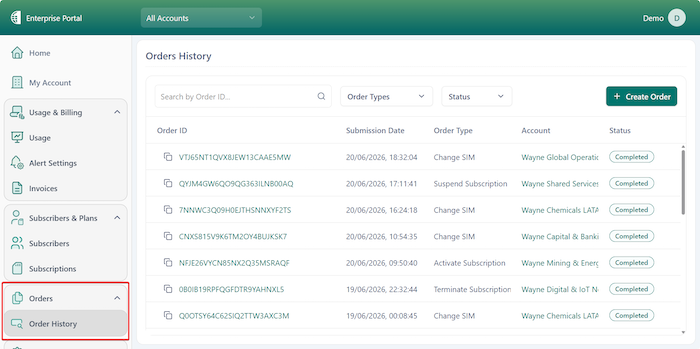
The “New Order” action triggers an order wizard, allowing users to select the order type:
a. Suspend subscription – suspending an active subscription. The subscription will not be able to send and receive calls and messages. Subscription recurrent fees will continue.
b. Resume subscription – resuming a suspended subscription. The subscription will be able to send and receive calls and messages again. Service is restored immediately.
c. Replacing a SIM with a new eSIM – create a new eSIM profile. The new eSIM can be sent to specified Email addresses or directly to the device (requires providing the destination device EID). The new eSIM profile becomes active when loaded and activated in the target mobile device, and existing SIM become inactive immediately.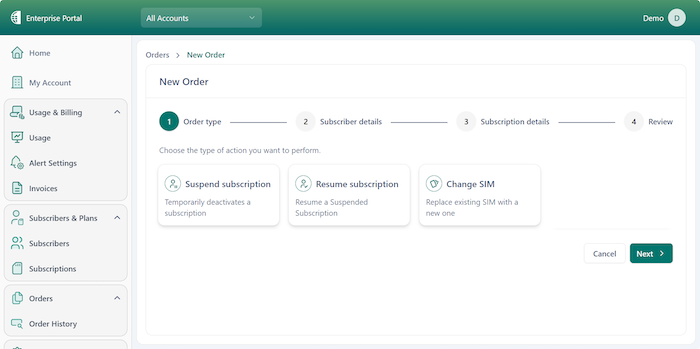
3. Orders are submitted and processed in near real time. Customers can track order status and review completed actions from the Order History page.
🎬Getting Started
Log in to the Enterprise Portal.
Navigate to Orders.
Select Create Order.
Choose Suspend Subscription, Resume Subscription, or Change SIM.
Follow the guided workflow and submit the order.
⚠ Action Required
No action is required. Customers can begin using the new Orders module immediately through the Enterprise Portal.

