Enterprise Portal - Usage Alerts Now Available
📣 Overview
The Enterprise Portal now provides self-service configuration of Usage Alerts. Administrators can define notification thresholds for voice, messaging, and data usage, helping organizations proactively manage consumption and avoid unexpected charges or service disruptions.
Availability: General Availability. The feature will be gradually enabled for customers beginning June 30, 2026.
👥 Who’s Affected
All 1GLOBAL Enterprise customers using the Enterprise Portal.
💡 What This Means for You
Gain visibility into account usage before thresholds are reached.
Reduce the risk of unexpected usage costs.
Notify both administrators and end users when usage approaches defined limits.
Manage alert policies centrally through the Enterprise Portal.
🆕 What's New
The Usage & Billing module now includes “Alert Settings” page, that allows administrators to select the desired alert “profile” (from a list of 10 predefined profiles), for each account. Ten predefined alert profiles are available, each containing different usage threshold configurations. Administrators can select the profile that best matches their organization's monitoring requirements.
Alerts are sent to both account owners via email, and the users affected by SMS message.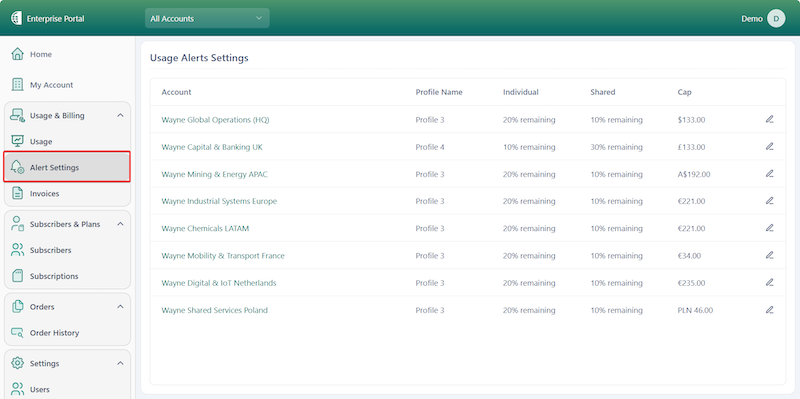
Sent alerts can be reviewed in the “Sent Alerts” page, which presents all sent alert notifications to admins and users.
🎬 Getting Started
Log in to the Enterprise Portal.
Navigate to Usage & Billing module.
Select Alert Settings.
Find the relevant account and click on the edit action (pencil icon).
In the opened screen, choose the desired alert profile and specify the destination emails.
⚠ Action Required
No action is required. Once enabled for your organization, Usage Alerts can be configured from the Alert Settings page within the Enterprise Portal.

